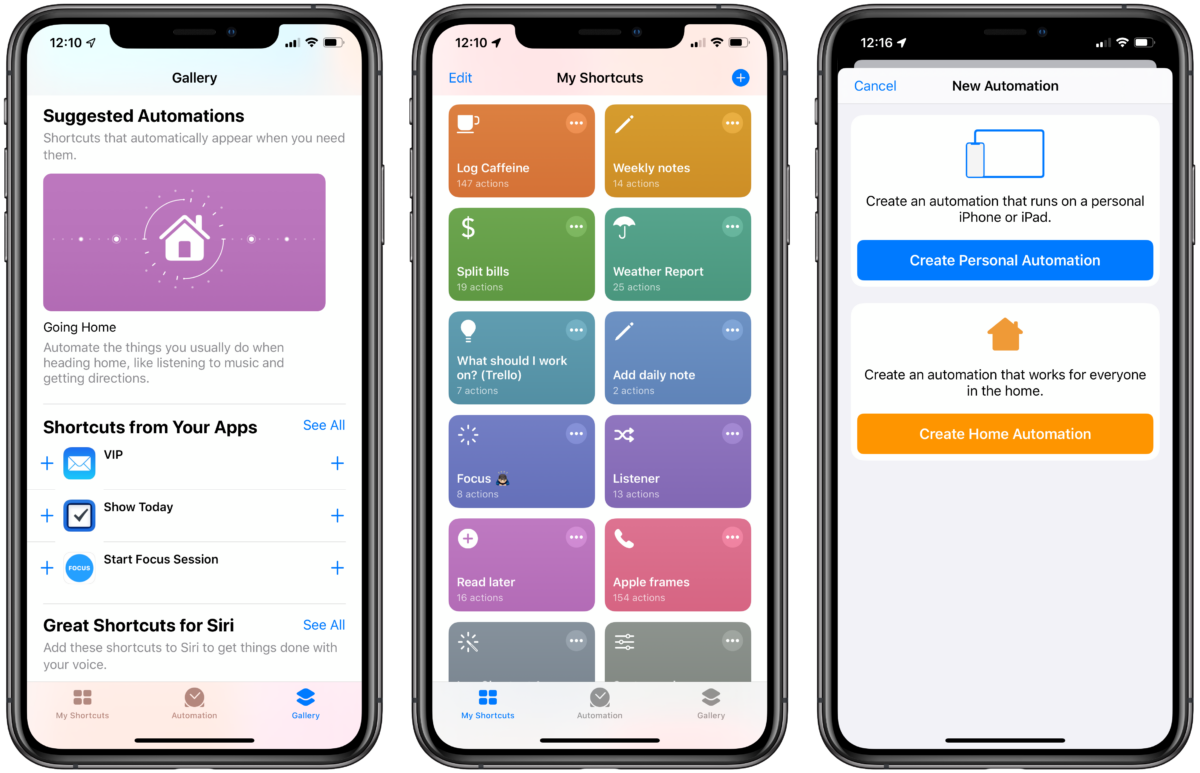
What to know about the Siri Shortcuts beta

With about 2,500 words and 24 screenshots, I covered everything that’s new in the betas so far for iMore

Yours truly, writing for iMore:

For this update, Apple reworked some the fundamentals of Siri Shortcuts, taking the Shortcuts app’s powerful actions and offering those capabilities to other apps on the App Store. Plus, they all work fully in Siri, marking another step forward in Apple’s voice strategy.

The Shortcuts app has been redesigned, making it easier to understand and get started with, there’s powerful new Automation capabilities that let you run your Siri Shortcuts based on a series of triggers, and the Gallery now has new automatic recommendations based on your personal usage.

With about 2,500 words and 24 screenshots, I covered everything that’s new in the betas so far. I’ll be revisiting each topic over time, but this is the best way to get all the news in one place.

Check out the full post.

Posts You Might Like

How the Shortcuts widget makes the Home Screen much more powerful
From Shortcuts stacks to entire screens of App Suggestions — here's how to make your Home Screen smarter.
Apple should add a Lock Screen widget for Shortcuts
Apple's big addition for iOS 16 was Lock Screen widgets, but their powerful automation app was left out. In my column for iMore, I took a look at the history of Shortcuts and argue why it dictates the widget should get added.
14 Shortcuts for Safari Views, Tab Groups, and Focus Filters to use with iOS 16
Writing about Shortcuts/Workflow (and HomePod) on the Web
Collecting some recent links about Workflow & HomePod from The Sweet Setup and iMore